Delete your account and data
Two routes, both permanent. Do it yourself in the app in four taps, or send us a written request if you have already uninstalled it. Below is exactly what is removed, what is kept, and how long it takes.
Option 1 — delete it in the app
The fastest route, and the one we recommend. It works while you are still signed in.
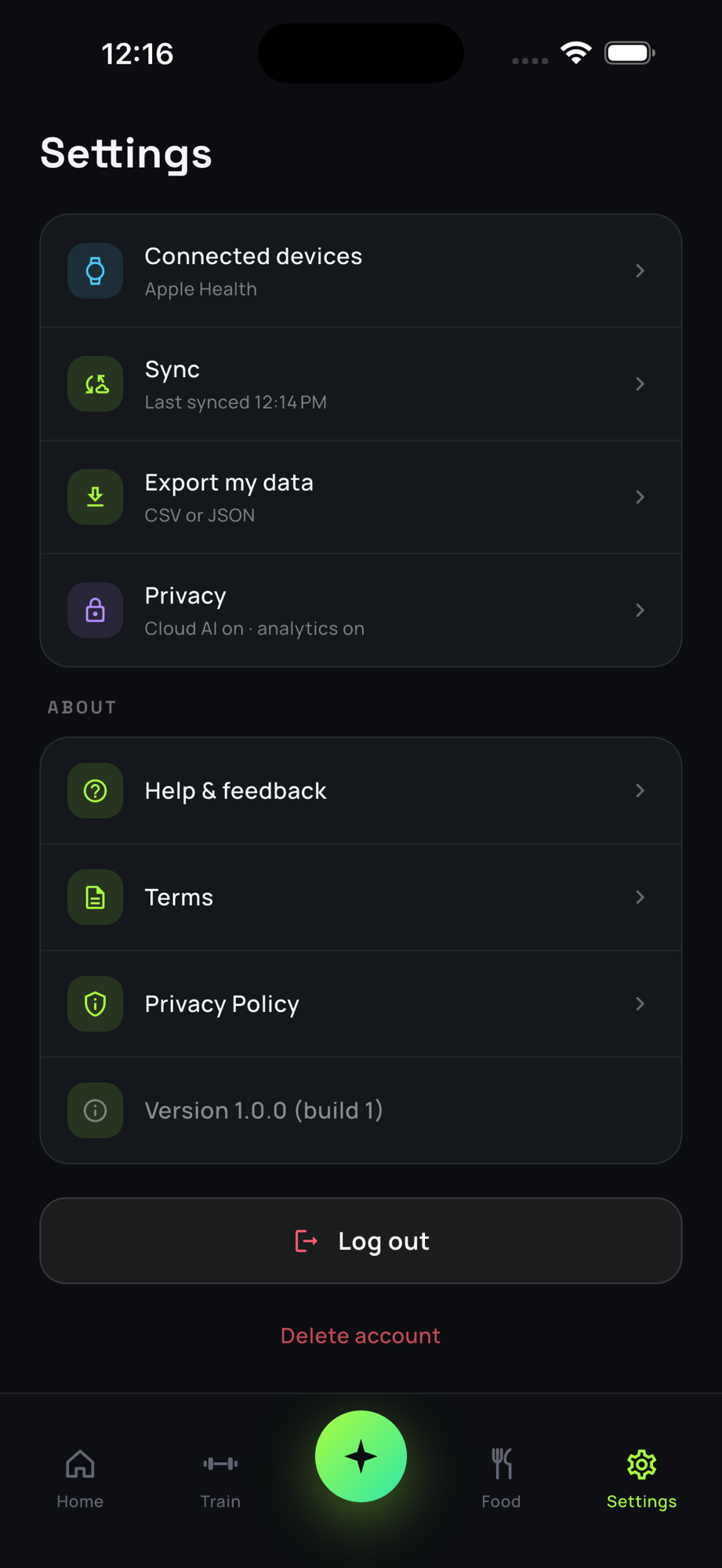
- Open GymLog AI Make sure you are signed in to the account you want removed.
- Go to Settings The gear tab on the far right of the bottom bar.
- Scroll to the bottom Past About, below the Log out button.
- Tap “Delete account” The red text circled in the screenshot, then confirm when asked. There is no undo.
Export first if you might want it back
Settings → Export my data hands you the entire log as CSV or JSON in a few seconds. Once deletion runs, your training history cannot be recovered — not by you, and not by us.
Option 2 — ask us to delete it
If you no longer have the app installed, cannot sign in, or would simply rather we did it, send a deletion request. Write from the email address on the account — that is how we verify the request is yours — and include nothing else; we do not need any other information about you.
We confirm receipt within 3 working days and complete the deletion within 30 days. If we cannot match the address to an account, we will tell you rather than guess.
What gets deleted
Both routes remove the same things. “Deleted” here means erased from our systems, not merely hidden from you.
| Data | What happens | When |
|---|---|---|
| Account and sign-in identity | Deleted, including the link to Google or Apple sign-in. You can sign up again later, but it will be a new, empty account. | Immediately |
| Profile | Name, email, goal, experience, date of birth, gender, injuries — deleted. | Within 30 days |
| Training log | Workouts, sets, plans, personal records and history — deleted. | Within 30 days |
| Nutrition log | Food entries, custom foods, meal templates, grocery items and water entries — deleted. | Within 30 days |
| Body data | Weight, body fat, girth measurements — deleted. | Within 30 days |
| Progress photos | The encrypted image objects are deleted from storage. They were never readable by us in the first place. | Within 30 days |
| Devices and reminders | Push notification tokens are deleted, so notifications stop. | Immediately |
| Coach chat | Never left your device to begin with. Removed with the app data when you uninstall. | On uninstall |
| Everything on your phone | The local database holding your log is removed when you uninstall the app or clear its storage. | On uninstall |
What we keep, and why
- Anonymised, aggregated statistics — counts that cannot be traced back to you or re-identified. These are not deleted, because there is nothing left in them that is yours.
- Crash reports already collected, which carry a hashed identifier rather than your email, for up to 90 days.
- Records the law requires us to retain, for as long as it requires and no longer.
Encrypted backups roll off on their own schedule and are fully purged within 30 days of the deletion request.
Uninstalling is not deleting
Removing the app clears the copy on your phone, but your synced account stays until you delete it by one of the two routes above. If you want both gone, delete the account first, then uninstall.
Questions
Anything about deletion, or a request that has not been answered: privacy@gymlogai.app. The full picture of what we collect and why is in the Privacy Policy.